MT4 and MT5 are still where most retail forex and gold traders place their trades, and more of them now want AI on the same screen. The trouble is that "AI on MT4" can mean four very different things. An AI expert advisor trades for you. An AI indicator draws signals on your chart. MT5's built-in AI Assistant answers questions inside the platform. An AI trading terminal signs in with your MT4 or MT5 account and analyses the chart you are about to trade.
This guide explains how MT4 and MT5 differ, compares the four ways to use AI on them, and walks through the setup step by step. One of the tools mentioned, Arka Terminal, is built by us. We say so where it appears.
The short answer
- You want the trading done for you: an AI expert advisor (EA). It is the riskiest route, so vet it on a demo account first.
- You want arrows or zones on the chart and will decide yourself: an AI indicator. Check that it does not repaint.
- You are on MT5 and want to ask questions or write MQL5 code: the AI Assistant built into MT5.
- You want AI that reads your chart, positions and risk before you click buy: an AI trading terminal that signs in with your account, such as Arka Terminal.
MT4 vs MT5: what is different
Both platforms come from MetaQuotes. MT4 was built around forex. MT5 came later with more timeframes, more order types and a much faster strategy tester. Most brokers offer both.
| MT4 | MT5 | |
|---|---|---|
| Chart timeframes | 9 | 21 |
| Built-in indicators | 30 | 38 |
| Pending order types | 4 | 6 |
| Programming language | MQL4 | MQL5, which does not run MQL4 programs |
| Strategy tester | Single thread, one symbol | Multi-threaded, several symbols at once |
| Economic calendar | No | Built in |
| Built-in AI Assistant | No | Yes, since mid-2026 |
If you are starting fresh, MT5 is the safer choice. If the EA or indicator you depend on only exists for MT4, staying on MT4 is fine. Everything below applies to both platforms unless it says otherwise.
Four ways to use AI on MT4 and MT5
1. AI expert advisors (EAs)
An EA is a program written in MQL4 or MQL5 that opens and closes trades by itself when its conditions are met. Many are now sold as "AI EAs" or "neural network EAs". The appeal is obvious: it trades while you sleep.
The risk is just as clear. An EA tuned to fit past prices can show a beautiful backtest and still lose money once the market changes. Before you run one on real money:
- Ask for a live track record of at least six months, not a backtest or a screenshot of one good month.
- Look at the maximum drawdown, not only the profit. A 300% year with a 70% drawdown is a warning.
- Find out whether it uses martingale or grid logic, which adds to losing positions and can wipe out an account in one bad move.
- Treat any promise of guaranteed or fixed monthly returns as a reason to walk away.
- Run it on a demo account for several weeks before you give it a small live account.
2. AI indicators
An AI indicator draws buy and sell arrows, trend colours or zones on your chart. You still place the trades. Indicators are easy to install and light on resources, which is why they are the most common way traders try AI first.
The main trap is repainting. Some indicators redraw past signals once later candles have closed, so the history looks far more accurate than it was in real time. To check, run the indicator in the strategy tester's visual mode, or watch it live for a week and write down each signal at the moment it appears.
3. MT5's built-in AI Assistant
In mid-2026 MetaQuotes added an AI Assistant to MT5. It sits inside the terminal, can discuss a chart, review your trading history and help write MQL5 indicators and EAs. A light model is free with an MQL5.community account, and you can connect your own AI service with an API key.
It is a general language model running inside MT5, not a forecasting model trained on market data, and it is not available on MT4. It is most useful if you write or modify your own EAs.
4. An AI trading terminal that signs in with your account
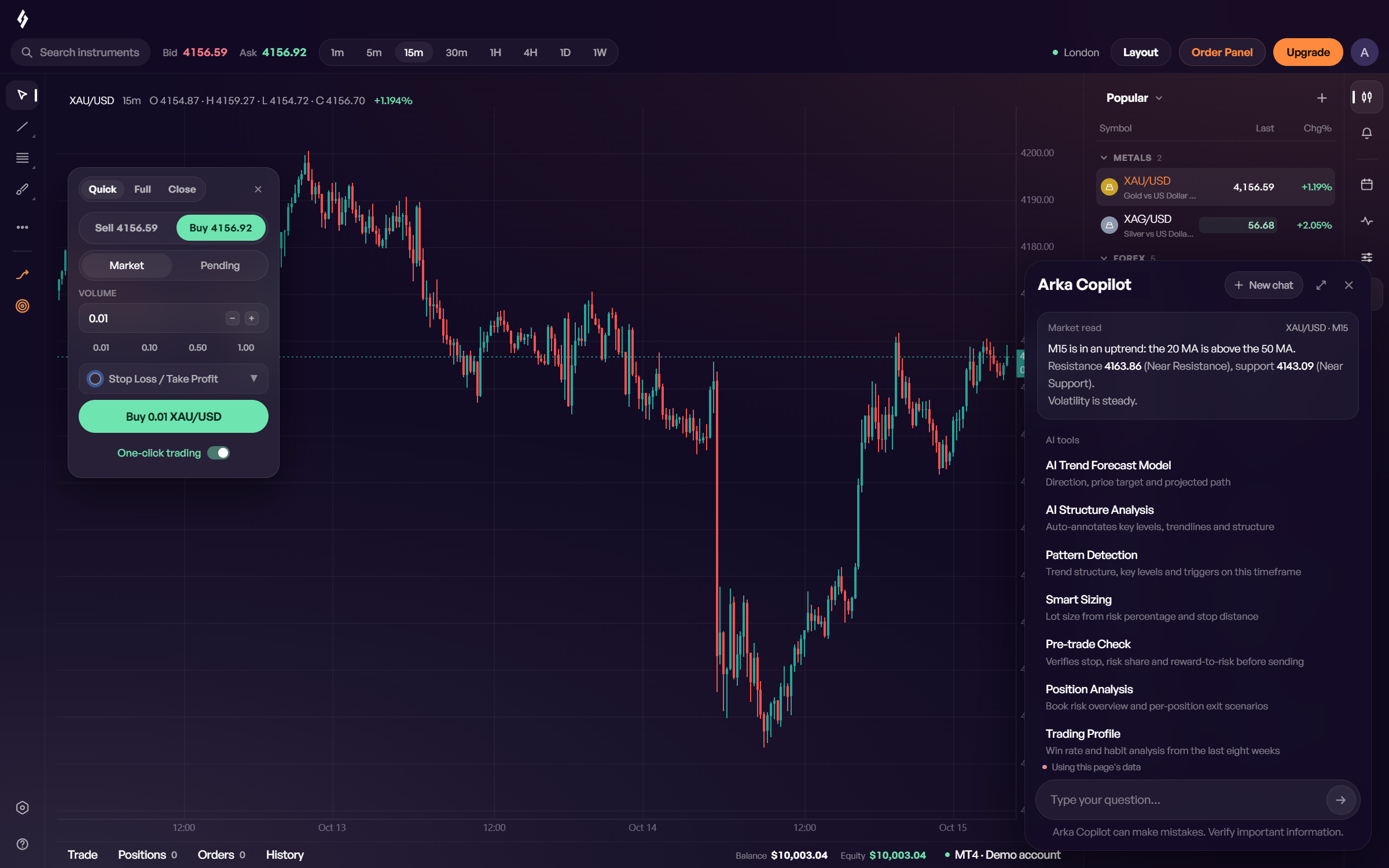
The fourth option keeps your broker and your MT4 or MT5 account and changes the screen you trade on. You sign in to the terminal with your existing account, and the AI works on the same chart where you place orders. It explains its reasoning, and you decide and send every order yourself.
This is what Arka Terminal does. It is our product, a free Windows terminal for MT4 and MT5 accounts.
The four compared
| Method | Who places the order | Strength | What to watch |
|---|---|---|---|
| AI EA | The program | Trades around the clock | Curve-fitting, martingale, return promises |
| AI indicator | You | Easy to install and light | Repainting, no reasoning shown |
| MT5 AI Assistant | You | Built in, helps with MQL5 code | General model, MT5 only |
| AI trading terminal | You | Reads chart, positions and risk together | The final decision is still yours |
Step by step: adding AI chart analysis to your MT4 or MT5 account
Using Arka Terminal as the example:
- Install. Download Arka Terminal for free on a Windows 10 or Windows 11 PC.
- Sign in with your account. Use the MT4 or MT5 account you already trade. Your broker, balance and history stay as they are. Your password stays on your computer and never reaches our servers. If you are new, start with a demo account.
- Open a chart. Pick the symbol you trade. Indicators, drawing tools and multi-chart layouts are ready on install.
- Ask the AI. AI trend analysis reads the latest 501 candles on the current timeframe and draws the projected path, target and stop on the chart. Arka Copilot answers questions with your chart, positions and account in view. On gold, the S&P 500, the Nasdaq 100 and a few other markets, options gamma levels sit on the chart as well.
- Check the risk before you click. Set the share of your balance you are willing to lose and where the stop goes, and the terminal works out the lot size. Drag the stop and target on the chart and see the money at each before the order goes out.
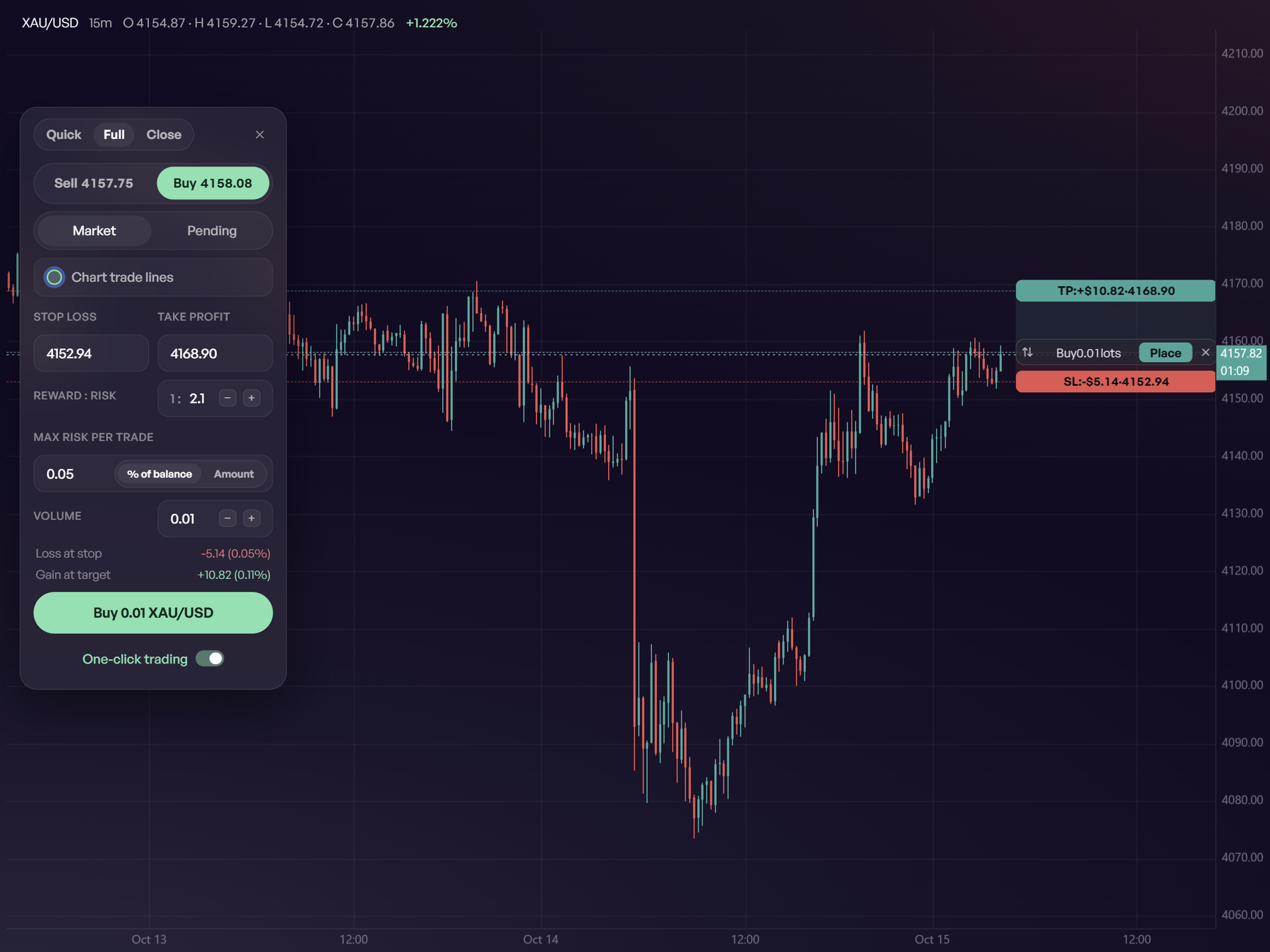
Orders go from your own MT4 or MT5 straight to your broker. The terminal never places a trade by itself.
Rules for trading with AI
- Set the risk first. Decide how much of the account one trade may lose, usually 1–2%, and size the position from that.
- Read AI output as a probability. Every model has losing days. Never enter on an AI signal without a stop.
- Watch the calendar. Around releases such as US jobs data or an FOMC decision, spreads widen and price can jump past your stop.
- Test on demo first. Give any new EA, indicator or AI tool a few weeks on a demo account before it touches real money.
- Keep a record. Note which AI reading you acted on and how it turned out. After fifty trades you will know whether it helps you.
For a wider look at the AI tools forex and gold traders use, including TradingView's Copilot and general chatbots, see our comparison of the best AI for forex and gold trading.
FAQ
Does MT4 have AI?
Not built in. On MT4 you add AI through an EA, an indicator, or a terminal that signs in with your MT4 account.
Does MT5 have a built-in AI?
Yes. Since mid-2026 MT5 has an AI Assistant that can discuss charts, review your trades and help write MQL5 code. It is a general language model, not a price forecasting model.
Can AI trade for me on MT5?
An EA can place trades automatically on MT4 or MT5. Whether it makes money depends on the EA and the market, and none can guarantee it. Test on demo first and keep the position size small.
Do I need to change broker to use an AI terminal?
No. Arka Terminal signs in with the MT4 or MT5 account you already have, and orders still go to your own broker.
Is Arka Terminal free?
The Windows download is free, and the free plan includes charting, risk-based order entry, the AI news panel, the main gamma levels and a weekly allowance of AI analysis. Members get more AI and the full signal details. See pricing.
This article is for information only and is not investment advice. Leveraged trading can lose more than your deposit.

